Soprano · learn
Start with the tune you know.
Short lessons take you from finding your first note to holding a part on your own. Your notes light up as you hit them.


Learn a part, sing it over the others, and share a song where every voice is yours. Bring friends or your choir. It runs in your browser, and learning is free.
In about two minutes you'll hear your own voice in a chord.
Amazing Grace · first lineGetting the voices ready...
Press Play. Tap a voice to bring it forward, or switch one off.
Amazing Grace's first line, "Amazing grace, how sweet the sound that saved a wretch like me.", in four parts: the soprano sings the tune, with the alto, tenor and bass under it. Your part is the Soprano. Press a voice to take it out of the harmony or bring it back.
Amazing grace, how sweet the sound that saved a wretch like me.
The melody, sung in the real Sing lane. The dot is the voice, the gems are the notes.
Attract mode
How it works
Each voice teaches you something. Sing the part that suits you, then stack more.
Soprano · learn
Short lessons take you from finding your first note to holding a part on your own. Your notes light up as you hit them.
Alto · a real voice
A singer sings your part first. Listen, sing along with them, then sing it on your own. Most songs start with a clear practice voice, and real voices join them part by part.
Tenor · record
Sing the next part while you hear the ones before. A quick timing check measures your headphones, so each take lands right where you sang it.
Bass · share
Polish it with one switch, then send a link anyone can open, or a short video with the words. Nothing is public until you share it.
Make your own
Sing your melody a line at a time, or write it note by note, and Stackapella writes the other parts to fit. Change any of them, then share it for friends to learn.
Free courses
Short lessons with a guide voice, from your first note to vibrato and barbershop. Try the first lesson without an account.
Start here
8 units and 32 lessons, from finding your comfortable note to singing all four parts of Amazing Grace.
Free tools
A tuner, a drone, a metronome and more, right in your browser, with no account.
The course
Short lessons, each one a stage. Earn up to three stars a lesson, collect XP to level up, and keep a weekly goal you choose.
Part leaderboards
Every part of every song has its own board. Record a take in the song's own key, at full speed, with the guide off, and your best score counts. Then challenge a friend to beat it.
FriendsEveryone
For conductors and teachers
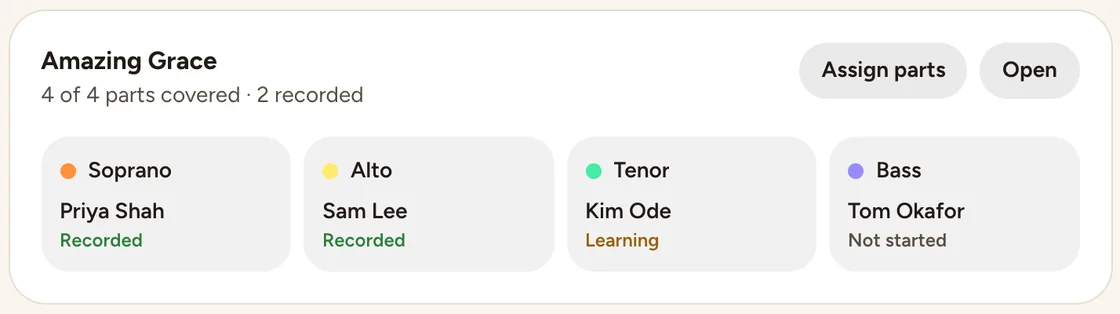
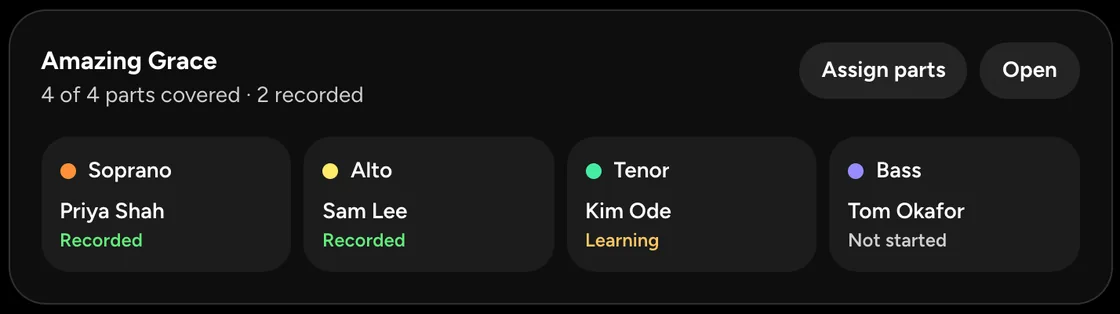
Under the game is a practice tool built for rehearsals: every part to learn at home, honest feedback as they sing, and a place to see who has started and recorded their part.
Learn your part at home, so rehearsal is for singing together.
Press start to continue
Guide voices
Most songs start with a practice voice. Sing a part you're proud of and make your harmony public, and we may choose your part as the voice everyone learns from, credited to you by your profile name.
Select mode
For every singer.
$0
Free forever. No card.
What you get
For arrangers and creators.
$3.33 a month
Billed $39.99 once a year.
$4.99 a month
Billed monthly. Cancel anytime.
Everything in Free, plus
Learning tracks for a choir are separate: For choir directors
Try it free for 7 days first. Cancel any time.
Tax is added where it applies.
Compare the plansNo. The mic in your phone or laptop is fine to start. Headphones matter more than the mic.
For recording a part over the others, yes: with headphones on, the other parts stay out of your new take. Wired ones keep the timing tightest. Bluetooth works too, after a quick timing check.
Yes, in Safari 16.4 or newer. Add it to your home screen (Share, then Add to Home Screen), so Safari keeps your songs safe.
Only you, until you choose. Your singing stays on your device until you save it to your account or share it, and a shared harmony can be heard only by people with its link. If you make a song public, its parts may become guide voices for other singers, credited to you; making it private again stops that. The code is open source, so you can check this yourself.
Yes, if you'd like it to. Most songs start with a practice voice. When you share a harmony and say yes to featuring it, it's public, and we may choose your part as the voice everyone learns from, credited to you by your profile name. Public harmonies are for singers 18 and over. Untick featuring any time, and your voice stops being a guide.
No. No app can replace a real vocal coach. Only a person can hear everything and guide you. That's why Stackapella is built to work with coaches: soon you'll be able to send a coach your takes and learn with them right here. Until then, Stackapella is for practising between lessons, or for starting out.
Yes. Learning is free, with no card and no time limit: every course, every song with a free account, unlimited workouts, your history, recording every part, and singing with friends. You can start without an account. Plus, from $3.33 a month, adds more storage, MP3 and stems, and unlimited private arrangements.
No. You learn each part by ear from a guide voice, with the notes drawn as shapes you can follow.
Yes. Singing comes first here, but any part can be an instrument: record a ukulele, a guitar or a beatbox in the studio, name the part, and stack it with the voices.
Yes. Its code is open source under the Attribution Assurance License: read it, run it on your own server or build on it. The songs and the course are shared too, under CC BY-SA 4.0; only the singers' recorded voices aren't.
Now loadingOn the way
Press start
Lesson 1 starts with one comfortable note.